Architecture
A window is a loop you write in Rust:
- Start it (
Boot,run!). - Color it (
Tokens). - Name the commands (
ActionTable). - Draw controls (constructors return
Elements and send your messages). - Arrange them (patterns and layout).
- Keep the data in your program.
updatechanges that data when a message arrives. A database file, if you have one, is yours — icedtea does not write it.
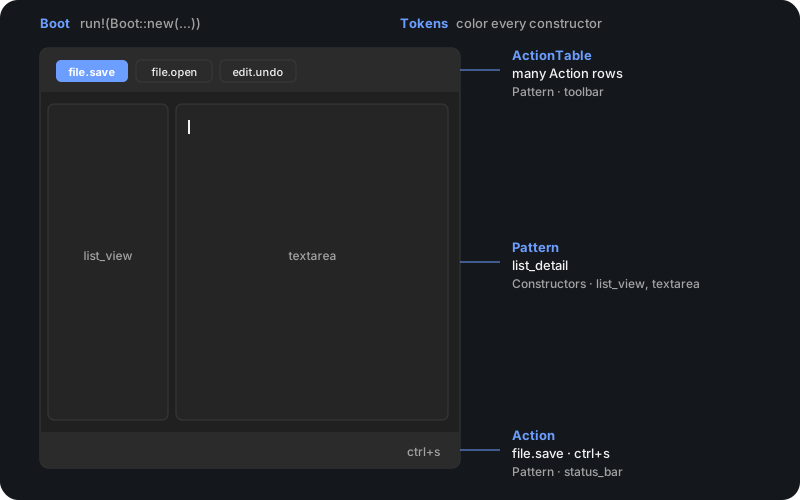
The application owns state and any file on disk. Constructors return
Elements and send messages. One Action is declared once. Paint is
Material Design 3 roles on Tokens (density, type scale, shape,
elevation). Persist follows the host light/dark pair. Chrome rows
take Direction from Boot and mirror. Lists, tables, and trees
virtualize. Select-and-copy is one select contract. Every drawing
constructor takes A11y.
Start the window
Boot
sets title, application id, theme name, locale, density, type scale,
shape, elevation, window kind (application, dialog, or overlay),
transparent buffer, and client decorations.
Catalog::for_locale fills chrome strings for that locale (English,
Vietnamese, Japanese, Chinese, Arabic, Urdu).
run! loads
that and starts iced.
daemon!
uses the same Prepared
settings when the process must stay up with no window mapped.
A desktop shell is that daemon plus Boot knobs and workspace
leaf headers — the same constructors a single-window tool calls.
bootstrap
is that path without opening a window.
Color it
theme::named
and theme::mix
produce Tokens.
Every constructor takes tokens. Persist defaults follow-OS on, so host
chrome layers onto the light / dark desktop pair. A named colorway
is a choice. Register more on ThemeCatalog. See Theming.
Put commands in a table
An ActionTable
holds as many Actions
as you insert. The table is what the menu bar, toolbar, shortcuts,
context menus, footer hints, and command palette read. Each Action is
declared once and carries your message. Write ctrl+s once: Command
on macOS, Control on Linux and Windows. See Actions.
Call constructors
Functions in widget
return iced Elements and emit your messages. Each widget constructor
takes A11y and tokens. Chrome rows take an ActionTable. The
application owns the buffer, the selection, and the rest of the state.
update applies the message. See Accessibility.
Move it
The application owns iced::Animation and the clock. Constructors
paint one frame from a 0–1 progress. See Motion.
Arrange with patterns
pattern
lays constructors out: toolbar and status_bar from the action
table, list_detail beside a filling pane, main_window.
layout
is the box recipes: layout::pack, layout::wrap, layout::dock,
layout::split_view, layout::clamp, layout::form. See
Layout.
Keys
An open modal consumes keys first. Otherwise a focused field owns
unmodified typing. Otherwise the focused focus::target owns arrows,
Page, Home, End, Enter, and Space. Tab walks targets (focus::cycle).
run! subscribes key::listen. Application windows call
ActionTable::seed_quit. Open menus, picks, context menus, drawers,
and cancel dialogs close on Escape. menu_bar on_open publishes
that open and close (including a pick) so KeyContext.modal_open
follows the model. item_press primary fires on
release; ListOpts.on_context is the secondary click. Otherwise
key::handle matches the action table. A filling scroll pane
takes arrows without painting a ring. See Actions.
First window is the smallest case of this compose. Keep a task list is the same loop with a list and a SQLite file the application opens and writes. The reference names every public constructor. Crate docs · source.